Excel® Document - all Passwords except Password to Open |
Top Previous Next |
Microsoft® Excel® documents can be protected with the following types of passwords:
•Password to Open (can be Strong or Weak)
•Password to Modify (Write Protection Password)
•Book Password
•Shared Book Password
•Sheet Passwords
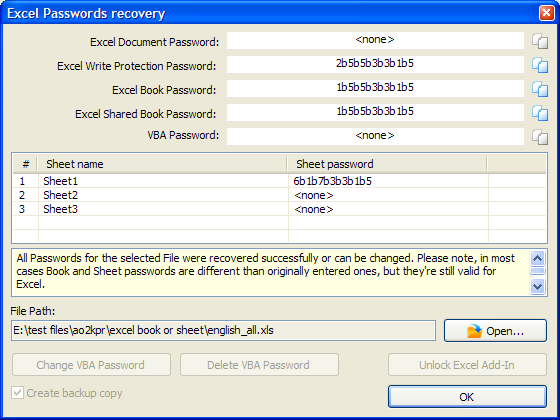
All Excel® Passwords except Strong Password to Open are recovered instantly. Once you open an Excel® document, AOPR shows the following dialog:
Please note that some of these passwords may differ from ones originally set in Excel®. However, Excel® will accept these passwords.
You also can change or delete VBA passwords and Unlock Excel Add-In (XLA).
Get more information about Advanced Office Password Recovery
Get full version of Advanced Office Password Recovery
© 2021 ElcomSoft Co.Ltd.
